
How to View & Analyze Chrome Extension manifest.json Files
View and analyze a Chrome extension manifest.json file before installing. Understand permissions, host_permissions, service workers, and CSP security rules.
Every Chrome extension centers on its root manifest.json file, which declares manifest_version, API permissions, host_permissions, content_scripts match patterns, background.service_worker entry points, and content_security_policy rules. To view manifest.json safely before installing an extension, inspect the Chrome Web Store package or local .crx/.zip file statically using Extension X-Ray.
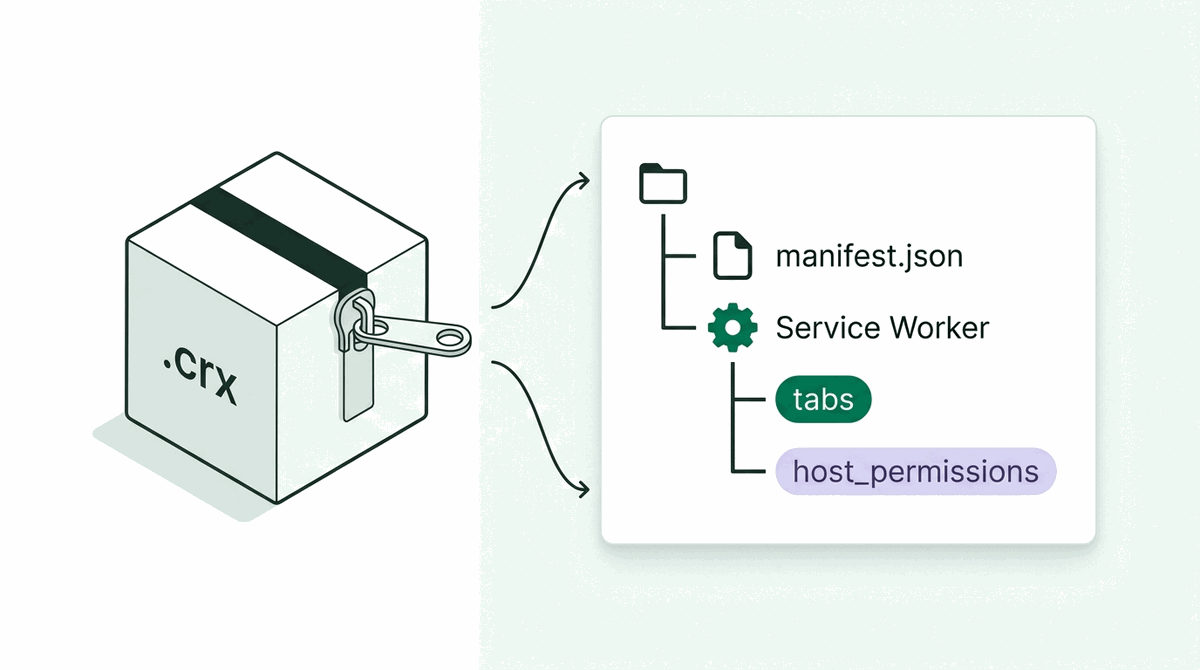
1. What manifest.json Controls Inside a Chrome Extension
Unlike an ordinary web app, every Chromium browser extension begins execution from a single declarative JSON file at the root of the archive: manifest.json. Browser engines read this file first to determine what API capabilities the extension receives, which websites its scripts can alter, and which background file starts when browser events fire.
Reviewing manifest.json before installing lets you map the exact privilege surface of an extension cleanly—before deciding whether deeper JavaScript source auditing is warranted.
2. How to Open Any Extension manifest.json Without Installing It
Normally Chrome hides raw manifest details until after you click Add to Chrome and open your profile directory on disk. Using a static package viewer lets you inspect manifest.json directly from the Store page or a local archive:
- Navigate to any Chrome Web Store listing or prepare an authorized local .crx or .zip extension archive.
- Open Extension X-Ray from Chrome and trigger static inspection on the listing or upload the local archive into the viewer.
- Select manifest.json at the top of the unpacked file tree to inspect formatted JSON properties cleanly without running packaged code.
- Follow every declared script path (background.service_worker, content_scripts[].js, action.default_popup) directly inside the same file explorer.
3. Key Manifest V3 Properties Every Reviewer Should Inspect
Compare what each security-sensitive key inside manifest.json reveals during static pre-install evaluation:
| Analysis Capability | Extension X-Ray | chrome://extensions Page | Manual ZIP / CRX Extract |
|---|---|---|---|
| Pre-Install manifest.json View | Inspect directly from Chrome Web Store or local CRX/ZIP | Requires installing extension first | Requires fetching CRX and handling Cr24 binary header |
| Permission & Host Scope Clarity | Highlights permissions, host_permissions, and matches | Shows simplified OS permission alerts only | Raw unhighlighted JSON text file |
| Entry-Point Code Navigation | Jump straight into service_worker and content_scripts files | Inspection limited to installed profile debugging | Navigate local folders manually in IDE |
| Non-Execution Read-Only Check | Does not install target extension into browser session | Extension is already active inside profile | Safe read-only text inspection on disk |
4. Cross-Checking Declared Manifest Keys Against Packaged Scripts
Pay close attention to five Manifest V3 keys: permissions (APIs such as cookies, tabs, storage, webRequest, or scripting), optional_permissions (runtime-requested privileges), host_permissions (URL origins allowed for cross-origin fetch or injection), externally_connectable (which websites or other extensions can message the worker), and web_accessible_resources (files web pages can probe to fingerprint installation).
A clean manifest.json check still only captures static declarations at that version: always cross-check declared permissions against the referenced background service worker and content script files, and remember that static inspection never guarantees absence of remote backend issues or future extension updates.
Product scope and further reading
Editorial methodology: Written and maintained by Elnavix Labs from inspected Chrome extension package behavior, media container specifications, and official platform documentation. Visual figures are AI-generated conceptual diagrams; always check the official product listing for current release scope.
Inspect Any Extension manifest.json in Seconds
Browse full extension package trees, examine Manifest V3 permissions, and jump straight into service workers statically with Extension X-Ray.
Add Extension X-Ray to Chrome (Free) →Official Chrome Web Store developer tool by Elnavix Labs. Static inspection does not certify safety.Frequently Asked Questions
Where is manifest.json located inside a Chrome extension?
Every valid Chrome extension requires a file named manifest.json placed directly in the root directory of its .crx or .zip package.
What is the difference between permissions and host_permissions in Manifest V3?
The permissions array unlocks browser API namespaces such as storage, tabs, or cookies, whereas host_permissions explicitly lists website URL patterns (for example https://example.com/* or wildcard patterns) the extension can read or inject scripts into.
Can I read an extension manifest.json online without downloading or running it?
Yes. Using Extension X-Ray inside Chrome lets you view manifest.json and the surrounding package tree directly from a Chrome Web Store page without installing the inspected extension into your browser.
What is manifest_version 3 vs manifest_version 2?
Manifest V3 (manifest_version: 3) is Chrome’s current extension platform standard that replaces persistent background pages with event-driven service workers, splits host_permissions cleanly from API permissions, and restricts remotely hosted executable code.